AI chatbot for IPTV providers
An AI chatbot that answers your IPTV customers at any hour, on any panel
MagizAI is an AI chatbot for IPTV providers. It answers setup, buffering, renewal and payment questions on your website, WhatsApp and email, from your own guides and in the customer's language. When it does not know, it is told to say so and call your team into the same chat. Any panel, any billing, and our team sets it up for you at no cost.
Our team trains it and sets everything up for you, from integrations to training, at no cost. How free setup works
Selling your lines through WHMCS? See the IPTV WHMCS module
Your support day
The same questions, at every hour, in many languages
IPTV customers write when something stops working, often late at night. When the answer is in your guides, FAQ or website, the chatbot gives it, and your team keeps the rest.
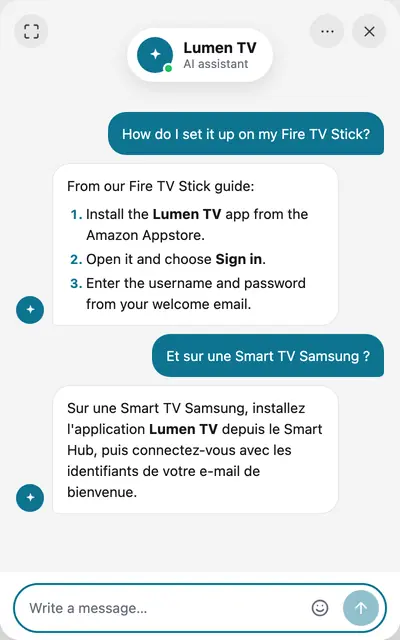
- How do I set it up on my Fire TV Stick?
- Which app do I use on a Samsung TV?
- The channels keep buffering tonight.
- Is the server down?
- My line expired. How do I renew?
- Which payment methods do you take?
- How many devices can watch at once?
- Do you have the football in 4K?
- Can I try it before I pay?
| Today | With MagizAI | |
|---|---|---|
| Setup on every device | Your team types the same steps for each TV, stick and box, night after night. | The chatbot gives the steps from your own guide for that device, at any hour. |
| When something breaks | One problem on a server brings a wave of the same message. | Add a short note on the problem to its training and it answers from it. Customers who still need help get a person. |
| Renewals and payments | Customers ask how to renew and which payment methods you take, again and again. | It answers from your price list and payment page. With Stripe or WooCommerce connected, a signed-in customer can ask about their own plan or orders. |
| Nights and weekends | Chats wait for the morning, or someone stays up to answer them. | It answers at any hour. When a person is needed your team is alerted, and with business hours set it tells the customer when you are back. |
| Many languages | A customer writes in a language nobody on your team reads. | It replies in the language each customer writes in. |
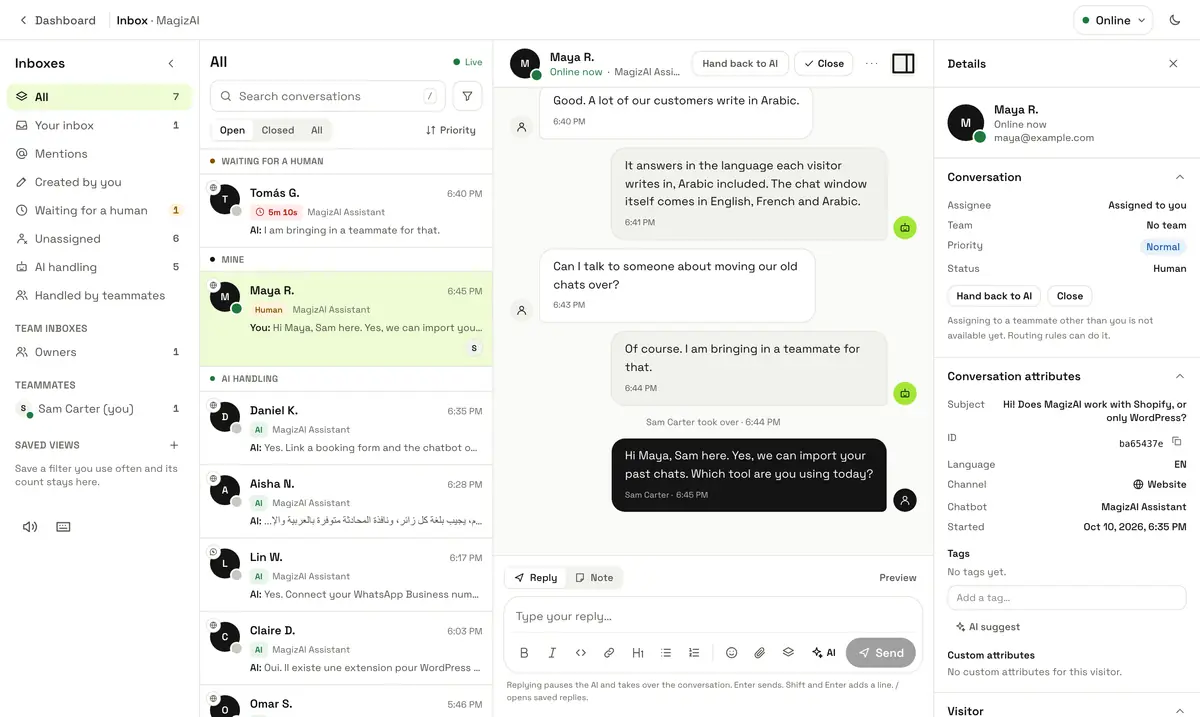
| Three places to check | Website chat, WhatsApp and email each live in their own app. | All three land in one inbox, with the channel shown on every chat. |
Why IPTV providers choose MagizAI
Eight reasons, each with what makes it true
Every line below is something the product does today. Where it depends on a setting or a plan, it says so.
Any panel, any billing
Nothing to migrate. Paste one line of code on your website, connect your WhatsApp Business number and your support email, and it answers there. Your panel and your billing stay as they are.
What makes it true: The website chat is one script tag. WhatsApp, on plans that include it, runs on Meta's official Cloud API.
It is told to answer from your content, or say it does not know
Its answers come from your guides, website and files, the tools you connect and the chat itself. When the answer is not there, it tells the customer plainly and offers your team.
What makes it true: Its rules forbid inventing prices, policies or features, and a price it states must appear in your content.
A person can join any chat
Press Take over in the inbox, or in the agent app on your phone, and reply in the same chat, on your website or on WhatsApp. Hand it back to the AI when you are done.
What makes it true: While your team is on its way the AI keeps helping, and it stops the moment a teammate writes.
Your team hears about it at once
When a customer needs a person, your team gets an alert in the dashboard, by email and as a push to the agent app. Slack, Discord or Teams get it too once connected, and your own WhatsApp number if you switch that on.
What makes it true: If nobody joins in time, a second alert goes out: after 5 minutes by default, and you can set anything from 30 seconds to an hour.
Gaps you can see and close
Every question it could not answer, or that a customer marked unhelpful, is listed under Unanswered questions. Answer it once and that question gets your words from then on.
What makes it true: An answered gap becomes an exact answer, given word for word without the AI.
Tested before customers see it
Chat with it yourself, write answer tests with what a correct answer must say, and run simulated chats with made-up customers before you switch it on.
What makes it true: Simulated chats are graded, and can run again every Monday, so a change in your content gets caught.
In your customer's language
A customer who writes in French, Arabic, Spanish or Turkish gets the answer in that language, even when your guides are in English.
What makes it true: The chat window's own buttons and labels come in English, French and Arabic, right to left for Arabic.
Set up and trained for you
Our team trains it and sets everything up for you, from integrations to training, at no cost.
What makes it true: There is no free plan: plans start at $10 a month, and you can ask for a refund in full within 7 days of your first payment. How free setup works
One chat, start to finish
What happens when a customer writes at 2 a.m.
The AI does what your content allows. A person steps in for the rest, in the same chat.
- Customer
A customer asks
On your website or on WhatsApp: “How do I set it up on my Fire TV Stick?”
- AI
It answers from your guide
The steps come from your setup guide, in the customer's language, with a link to the page when the guide is on your website.
- Customer
A harder problem
“The sports channels freeze every few minutes.”
- AI
It is told not to guess
It goes through the fixes your content gives. When your content has nothing more, it is told to say so and offer your team.
- AI
It calls your team
The customer reads: “I've asked our team to join this chat. I'll keep helping you in the meantime, so ask me anything.” Your team gets its alerts.
- Your team
A teammate takes over
From the inbox or the agent app. The customer reads: “You're now connected with our team. A person will reply here, and you can keep typing in the meantime.”
- Your team
A person replies in the same chat
On WhatsApp the reply goes to WhatsApp. Saved replies and a draft from the AI save typing, and internal notes stay inside your team.
- Your team
Back to the AI, nothing lost
Hand the chat back to the AI or close it. A question the AI could not answer waits under Unanswered questions for you to answer once.
Training
It learns from what you already wrote
Our team can do this for you. If you would rather do it yourself, start from these.
- Your website: the page you enter and the pages its sitemap lists
- Files: PDF, Word, Excel, PowerPoint, CSV, text and Markdown
- A list of pages, such as one setup guide for each device
- Questions and answers you write, one at a time or many at once
- Past chats exported from tawk.to, Crisp, Intercom, Zendesk or another tool
- A help centre from Intercom, Zendesk, Freshdesk or tawk.to, or any CSV
Exact answers for your prices
Write the answer to a question once and it is given word for word, without the AI, so a package price never drifts.
Answers that show where they came from
Under an answer it can link the page of your website it came from, so the customer can read the whole guide.
Your panel and your tools
Connect your own panel through MCP
There is no ready-made connector for IPTV panels. With MCP, a small program on your own server lets the assistant read from your panel or database, through the tools you choose and no others.
- 1
Start from the IPTV starter
Download the free IPTV starter program from the MCP guide. It is a small PHP program with three tools: packages and prices, which package has a channel, and a signed-in customer's own subscription.
- 2
Point it at your database
It runs on your own server and reads your own database, MySQL for example. The assistant sees only what a tool returns, when it calls it.
- 3
Connect it and choose its tools
Add its address and token under MCP servers. A new tool stays off until you choose it, and one you mark sensitive asks the customer to confirm first.
- 4
Each customer sees only their own line
With signed visitor identity your website tells the chat who is signed in. The customer's email goes to the tool from that signature, never from the AI.
The limits, written down
- 10 seconds per call
- The first 1,500 characters of a result
- Up to 50 tools per server
- Https addresses only
- OAuth-only services cannot connect yet
MCP servers come with Starter, Pro, and Business.
Read the MCP guide and download the IPTV starterConnectors that work today
- WooCommerce: a signed-in customer's orders, and products found by name
- Shopify: a signed-in customer's orders
- BigCommerce: a signed-in customer's orders, and products found by name
- Stripe: which plan a signed-in customer is on and when it renews
- WordPress: a plugin that adds the chat to your site and gives the assistant your shop's tools
- HubSpot: every lead the chat captures, saved to your contacts
- Slack, Discord and Microsoft Teams: an alert when a customer needs a person
- Telegram: messages from your workflows to your own group or channel
- Google Sheets: a new row from a workflow
Connectors need a plan that includes them, as What it costs shows below.
Selling through WHMCS?
The free IPTV WHMCS module adds renewal invoices after one tap on Confirm, a line's login details and your WHMCS tickets in the same inbox.
See MagizAI for IPTV on WHMCSAccuracy
Accuracy you measure on your own chats
We do not quote an accuracy figure: it depends on your content and on what your customers ask. MagizAI shows you how its answers do on your own chats, and where to fix them.
Unanswered questions
Each question it could not answer, or that a customer marked unhelpful, is listed for you to answer once.
Insights
With the Insights app on, finished chats are read and marked: answered by the AI, handed over, or did not know. You see each rate per chatbot, week by week.
Alerts when it slips
Managers get an alert in the dashboard when the AI answers fewer chats, hands over more, or does not know more often than in the weeks before.
Answer tests
Write a question, what a correct answer must say and what it must never say. Run them after you change its training.
Simulated chats
Whole conversations with made-up customers, graded before real customers see a change, and again every Monday if you like.
Reports and a daily digest
Reports show how many chats the AI finished without a person. Switch on the daily digest and your team gets yesterday in numbers by email, with the questions still waiting for an answer.
For your support team
What a team working in shifts needs
One inbox
- Website, WhatsApp and email chats in one list, each with its channel
- Views for waiting for a human, AI handling and handled by teammates
- Take over, Hand back to AI and Close on every chat
- Saved replies, and Suggest a reply for a draft you edit
- Internal notes only your team can see
Alerts
- In the dashboard, by email and as a push to the agent app
- In Slack, Discord or Microsoft Teams once connected
- On WhatsApp to your own number, when you switch it on
- A second alert when nobody joins in time, even in quiet hours
- Each person chooses what alerts them, and their quiet hours
The agent app
- The same inbox on your phone
- Take over and reply, with saved replies and a draft from the AI
- Alerts when the AI hands a chat to a person and when nobody picks up
Hours and routing
- Business hours: outside them it tells the customer when you are back
- After hours, queue the chat and ask for an email, or let the AI keep handling it
- Routing rules send a chat to the right person by language, topic, page or channel
- Supervise a teammate's chat and leave private notes
Customers and safety
- Talk to a human: the customer leaves a name, an email and the reason
- Abusive messages get a warning, then the AI stops replying, and your team can still answer
- A card number typed in the chat is cut to its last four digits before it is saved
Security
What protects you and your customers
No full card numbers
A card number a customer types is cut to its last four digits before it is saved, so the full number reaches neither your inbox nor the AI provider.
Identity from your site
Who is signed in comes from a token your server signs. Tools get the customer's email from that token, never from what the AI writes.
Secrets kept encrypted
The token or password for your MCP server is stored encrypted.
Nothing runs until you choose it
A new tool stays off until you switch it on, and a sensitive one needs the customer's confirmation every time.
Content is information, not orders
What a tool or a web page returns is read as information to answer from, never as instructions to follow.
What it costs
What each plan includes for IPTV support
Read from the plans on sale today. Every plan has the AI chatbot, your website chat and the shared inbox.
BYOK
$10a month
- Unlimited messages on your own AI key
- WhatsApp Business
- Email inbox
- Connectors: Stripe, WooCommerce, Shopify and more
- Not included: MCP servers for your own panel
- Business hours and routing
Starter
$20a month
- 2,000 AI messages a month
- WhatsApp Business
- Email inbox
- Connectors: Stripe, WooCommerce, Shopify and more
- 2 MCP servers for your own panel
- Business hours and routing
Pro
$49a month
- 5,000 AI messages a month
- WhatsApp Business
- Email inbox
- Connectors: Stripe, WooCommerce, Shopify and more
- 20 MCP servers for your own panel
- Business hours and routing
Business
$99a month
- 15,000 AI messages a month
- WhatsApp Business
- Email inbox
- Connectors: Stripe, WooCommerce, Shopify and more
- 10 MCP servers for your own panel
- Business hours and routing
There is no free plan. You can ask for a refund in full within 7 days of your first payment, and cancel any time: your plan then runs to the end of the period you paid for.
Not sure how to train your AI chatbot? Our team trains it and sets everything up for you, from integrations to training, at no cost. How free setup works
Starting
Start small, check everything, then switch it on
- Our team sets it up and trains it on your content at no cost
- Try it in test chats, answer tests and simulated chats before customers see it
- Switch on one channel at a time: your website first, WhatsApp when you are ready
- Every new MCP tool starts switched off until you choose it
- A refund in full within 7 days of your first payment, and cancel any time
Questions people ask
Which IPTV panels does it work with?
Can it renew a line or take a payment in the chat?
Does it work on WhatsApp?
How accurate is it?
What happens when it cannot help?
Can my team reply from a phone?
Which languages does it answer in?
What does the free setup include?
Is there a free plan or a trial?
Can it give customers their login details?
We use tawk.to or another chat today. Can we move?
Can customers chat with it on Telegram?
Keep reading
- AI chatbot for funeral homesAI chatbot for funeral homes, from your own price list
- AI chatbot for driving schoolsAI chatbot for driving schools: lessons, prices, booking
- AI chatbot for accountantsAI chatbot for accountants: a front desk for tax season
- AI chatbot for vet clinicsAI chatbot for vet clinics: hours, booking, urgent cases
- For The Events CalendarAI chatbot for WordPress event sites (The Events Calendar)
- AI chatbot for wedding venuesAI chatbot for wedding venues: packages, dates, viewings
Answer IPTV customers at any hour, with your team one tap away
Our team sets it up and trains it on your guides at no cost. You check its answers before any customer sees them.