Developers
API tokens
Make a token so your own software can use the MagizAI REST API: read chatbots and conversations, add knowledge and ask the bot.
Who can use it: Owner and Admin, or a custom role with "Change workspace settings and connections". A token acts as the person who made it, and each person sees and revokes only their own tokens.
Step 1: Open the API tokens tab
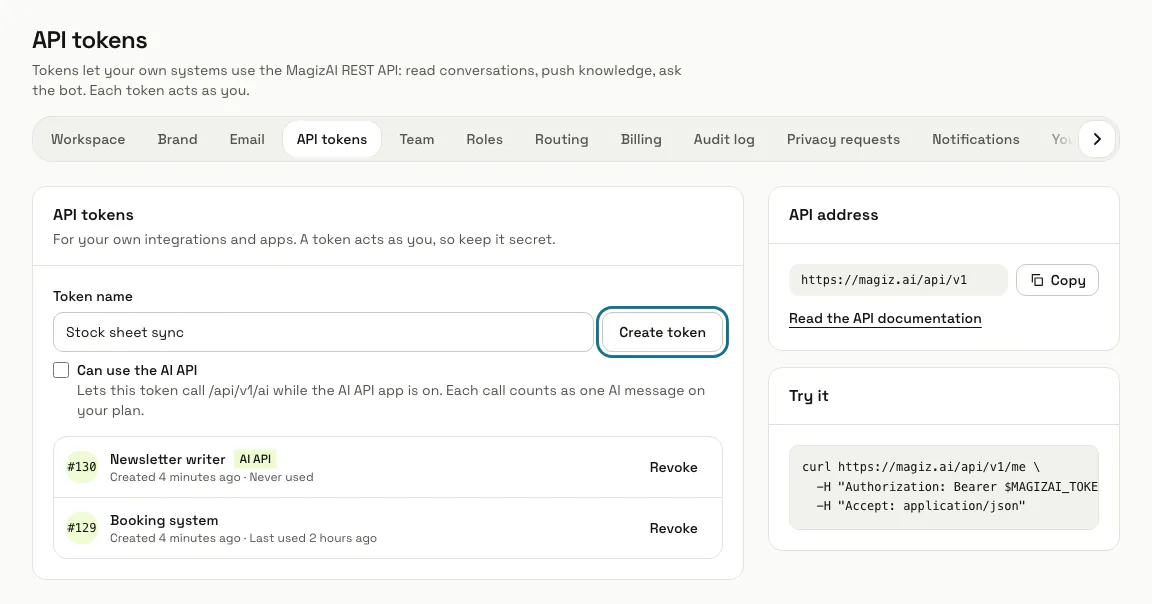
Press "Settings" in the left menu, then the "API tokens" tab. The page lists your tokens, the "API address" and a first call under "Try it".
Step 2: Name the token and press "Create token"
Type a "Token name" that says where it is used, such as Stock sheet sync. Tick "Can use the AI API" only for software that calls /api/v1/ai; the list marks those tokens "AI API".
Step 3: Copy the token now
The new token appears once, with a "Copy" button and the line "Copy your new token now. It will not be shown again." Keep it in your server's settings, never in a web page.
Step 4: Make a first call
Send the token in the Authorization header as a Bearer token, with Accept: application/json. The call under "Try it" asks /api/v1/me, which answers with your name, email and role and the workspace's name and plan.
curl https://magiz.ai/api/v1/me \
  -H "Authorization: Bearer $MAGIZAI_TOKEN" \
  -H "Accept: application/json"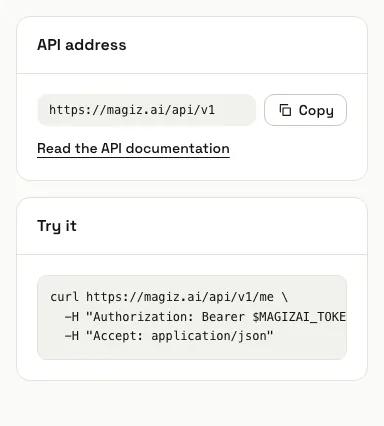
Step 5: Read the API documentation
Press "Read the API documentation" for the public reference at /api-docs. With this token you can list your chatbots and their conversations, read a conversation, add or remove knowledge, and send a visitor message to get the AI reply back.
The portal and agent APIs on the same page use tokens from their own sign-in endpoints: a token from this screen gets 403 there.
Step 6: Revoke a token you no longer use
Press "Revoke" beside it and confirm. Any software that uses it stops working at once.
Tips
- Each token shows when it was created and when it was last used, so an old one is easy to spot.
- Adding or removing knowledge needs "Manage training and knowledge", and sending a message needs "Reply to, take over and assign conversations", for the person who made the token.
- An AI reply to a message sent through the API counts as one AI message on your plan.
Limits and switches
- Up to 20 tokens per person. Revoke one before you make another.
- A token stops working 30 days after it is made, so make a new one before then.
- Tokens cannot be made during a support session.
- The REST API needs a plan that includes it. Without one, a REST token cannot be made (a token for the AI API still can) and /api/v1 answers 403 with the code plan_feature_unavailable.
Stuck on a step? Ask our team